The matrix records device coverage and the dated tests behind it. Historical hardware results predate 1.7 and do not stand in for its own checks; the dated rows below say what ran on which build.
- Physically verified: ran on the real device in my hands, with a recorded result.
- SDK simulated: exercised end to end against a mock Stream Deck WebSocket that replays the device’s exact registration and events. Strong evidence, not hardware.
- Community verified: a user ran the test procedure on real hardware and reported back. None yet; reports welcome.
- Compatible with limitations: expected to work from the SDK contract, with the listed caveats, but unproven.
Compatibility matrix
| Device | Keys | Dials | Status |
|---|---|---|---|
| Stream Deck + XL (9x4, 6 dials) | Yes | Yes | Physically verified 2026-07-09: 36 keys + 6 dials live, all themes, alerts, sparklines, touchscreen dials, 0.1 % CPU (see PERF.md). Elite/Custom preset gestures and rotation groups were physically verified on the same device on 2026-07-12. |
| Stream Deck +, 15-key, MK.2 | Yes | Yes (+) | SDK simulated: the e2e suite registers a 15-key (type 0) and a + (type 7) and drives keys on the former; every dial event is driven on the + XL, whose dials share the + code path. The + 4x2/4-encoder shape is locked by capability fixtures. |
| Stream Deck XL, Mini, Neo | Yes | n/a | Compatible with limitations: XL, Mini and Neo grids are locked by capability fixtures (test/devices.test.ts), and the key rendering they share is device-independent and e2e-driven on a mock 5x3 deck. Neo’s info bar and touch points are not used. |
| Stream Deck Mobile / Virtual | Yes | n/a | Compatible with limitations: grids are taken from what the app reports; grid changes while running need Stream Deck 7.0 (below that, reconnect refreshes them). |
| Corsair Voyager | Yes | n/a | Compatible with limitations: the built-in key row on the Corsair Voyager laptop. It is in the plugin’s model table (src/devices.ts), so it is named correctly in logs and reports and its keys render like any other keys-only deck, but its grid is taken from what the app reports, it has no capability fixture in test/devices.test.ts, and nothing about it is hardware-verified. A hardware report is the first step. |
| Pedal, Corsair G-Keys, SCUF controllers | HWiNFO Control only | n/a | Compatible with limitations: these have no display, so the sensor actions are pointless there, but the Control key action drives dials on other decks from them. Their device types are covered by capability fixtures only; the Control key path itself is e2e-driven from a mock 15-key deck (the command code never consults the key’s device). |
| Stream Deck Studio, Galleon 100 SD | Untested | Not claimed | No support is claimed for either, and the reasons differ. Studio (32 keys 16x2, 2 dials): the Stream Deck app ships encoder strip backgrounds for the +, the + XL and the Galleon, but not the Studio, so its dials have no drawable strip and a Sensor Dial there would render nowhere. Galleon 100 SD (a gaming keyboard with a built-in 12-key 3x4 deck, a screen and 2 dials): its screen does take encoder backgrounds, but at 720x384, a different class from the 200x100 per-encoder faces this plugin draws, and it has no touch input; supporting it properly is a rendering task, not a compatibility row. Both take the unknown-device fallback (keys and input still handled, “Unknown device” in logs and reports). A hardware report is the first step. |
| Unknown future devices | Fallback | Fallback | Nothing is claimed in advance: capabilities derive from the reported grid, input events are always handled, and rendering degrades to a no-op where there is no display. |
Stream Deck software floor is 6.9. Features from newer apps are detected at runtime and degrade: dynamic gesture hints use a 6.4-era API, deviceDidChange (7.0) falls back to connect-time device info, Key Logic (7.0) appears when the app supports it. Basic monitoring depends on none of them.
Sensor details (drill-down) support
The sensor detail view ships one bundled profile per deck type: Mini (3x2), 15-key (5x3, every revision), Neo (4x2), + (4x2 keys), XL (8x4) and + XL (9x4 keys). The Virtual Stream Deck borrows whichever keypad layout fits its user-sized grid (a 10x10 virtual deck runs the + XL layout). All bundles are generated from one layout table and structurally locked by test/detail-profiles.test.ts; the full switch-in, render and switch-back cycle is hardware-verified on my + XL (2026-07-28, first profile revision: entry switched the physical deck to the bundled view, all 36 tiles registered and rendered, and Back restored the exact previous profile; 2026-07-29, current revision: the editable page and the configurable Back tile rendered on the physical + XL, idle, single and dual, through the real settings panel). The upgrade path, the one-time install prompt and every Back layout were driven end to end through the real Stream Deck app on a 10x10 Virtual Stream Deck, and a + XL owner confirmed the first revision’s first-use install and folder return on their hardware (issue #5). The other classes are verified at the archive and mock-app level; a hardware report from a Mini, 15-key, Neo, + or XL is welcome. Decks without a bundled profile (Mobile, Studio, Galleon, pedals, G-keys, a virtual deck smaller than 3x2) refuse entry with the Stream Deck alert cue and keep the ordinary key behavior.

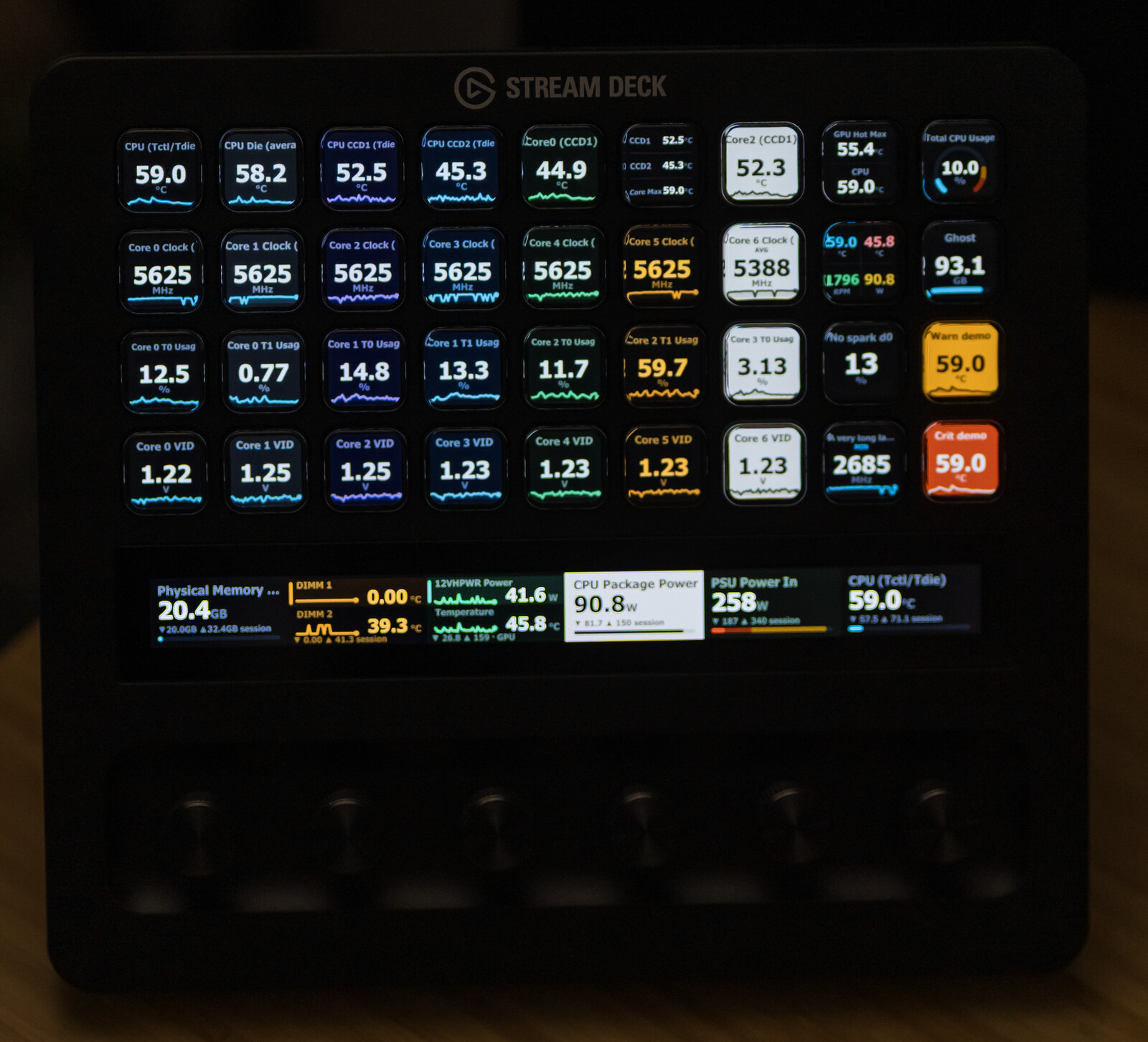
And the same claim as a photograph, not a render: my Stream Deck + XL running the validation page in July 2026, on an earlier version, 36 keys and six dial readouts live from HWiNFO (Sony A7 III, 85mm at f/2.5, developed once in Camera Raw; no compositing). Its text is Tahoma Bold, the default Text font; some 1.7 faces lay out differently.
Page swipe
The Stream Deck app handles sideways swipes. Selection and labels are saved settings. Hidden dials can retain pause, pin and session state for up to 30 minutes, subject to the hidden-dial limit.
Since 1.7, missing or invalid readings, stale or unavailable data, and source, unit or type changes reset affected sessions; a pairing edit resets only a session whose saved key now stands for a different measurement. Sparkline collection continues while a Sensor Reading key or Sensor Dial is visible somewhere. With none visible, polling stops and samples remain in memory. Returning can append to them; the line does not measure that unobserved interval. See history rules.
Hardware test procedure
To verify a device and have it listed as community verified:
- Install the plugin and put at least one Sensor Dial (if the device has dials) and one Sensor Reading key on it.
- Quit the Stream Deck app, then start it with the recorder armed so the plugin process inherits it: set the user environment variable
HWINFO_TRACE_EVENTS=1and restart the app. - Perform, in order: two slow turns each way, one fast spin, a short press, a half-second press, press+turn, a tap, a long touch, a page swipe away and back.
- Note what the dial did for each step (the controls page says what it should do for your preset).
- Collect
logs/trace-<pid>.jsonlfrom the plugin folder (%APPDATA%\Elgato\StreamDeck\Plugins\com.lawrensen.hwinfo.sdPlugin\logs) and the “Copy support report” output from the settings panel (Advanced → Support). - Open a GitHub issue titled “Hardware report:
" with the notes, the trace and the report.
The trace is redacted at the source: device identifiers are hashed, and no sensor values, sensor names, computer names or file paths are recorded. It exists so a capture from your hardware can be replayed, event for event, through the same state machine the test suite uses (test/traces/ holds the synthetic versions a real capture can replace).
Event recorder and replay
For development: HWINFO_TRACE_EVENTS=1 makes the plugin append one JSON line per input, lifecycle and render event to logs/trace-<pid>.jsonl. The field names match the fixtures in test/traces/, and test/gesture-replay.test.ts replays every fixture through the production gesture router, control schemes and rotation math. To turn a real capture into a regression test, trim the JSONL to the events of interest, wrap them in the fixture envelope (name, contexts, events, expect) and drop the file into test/traces/.
Support report
The Sensor Reading, Sensor Dial and HWiNFO Control panels have Copy support report: under Advanced → Support on a key or dial, and under Advanced on an HWiNFO Control key. It builds a local JSON summary (plugin and app version, devices by model and hashed ID, data-source state, sample age, Sensor Dial and HWiNFO Control action state, recent input events) and copies it to the clipboard. Nothing is uploaded anywhere: the plugin makes no network requests, and its only connection is the local WebSocket to the Stream Deck app. The tiles of the sensor detail view have no settings of their own and no report button.