When a key or dial cannot show a reading, it shows a status screen instead of a value. The first line names the observed state; the second gives a next step. Source recovery is automatic when readable data returns. A native bridge load failure can require an installation repair and plugin restart.
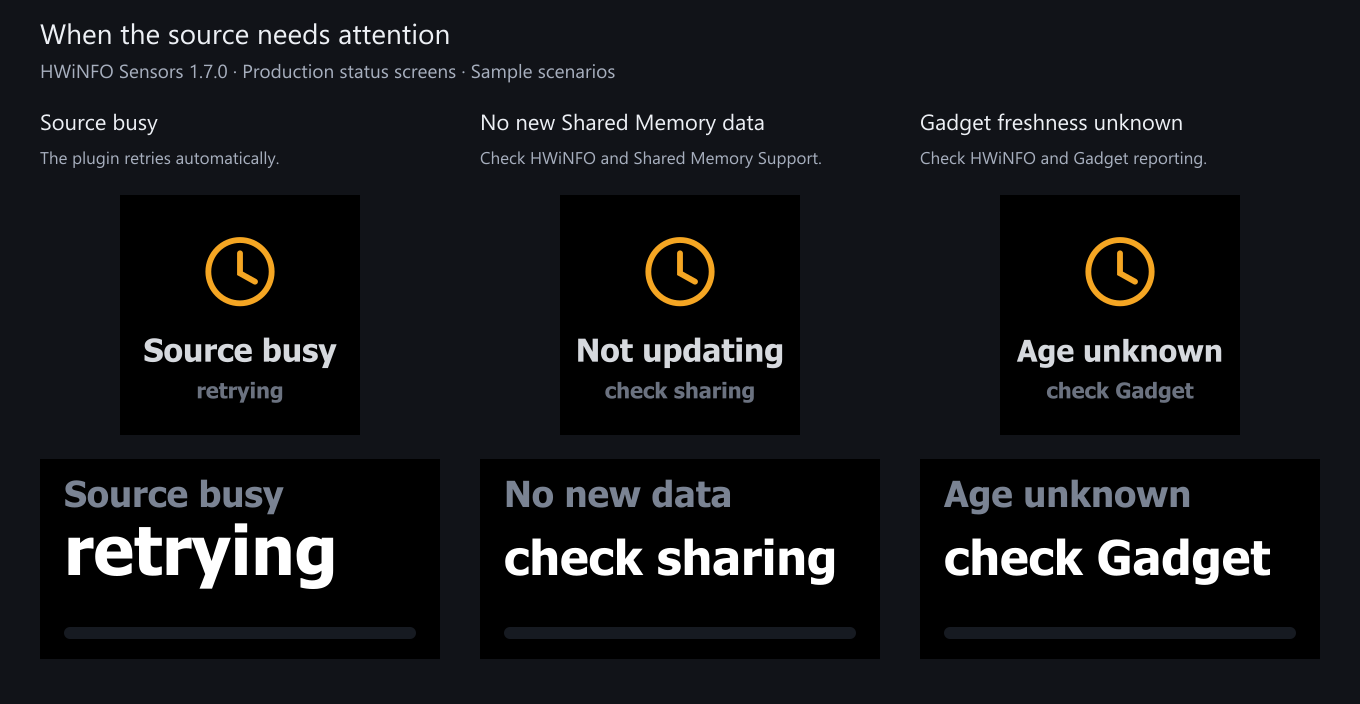
This page describes 1.7. The image uses simulated source states rendered by production code. It is not a hardware photograph.
Key screens
| Key shows | What it means | How to fix it |
|---|---|---|
| Start HWiNFO / not detected | HWiNFO isn’t running, or isn’t publishing to the selected data source (in Auto, to neither Shared Memory nor Gadget). | Start HWiNFO in Sensors-only mode with Shared Memory Support enabled; or, on the free version, enable Gadget reporting (no 12-hour limit) and tick the sensors you need. |
| Source busy / retrying | The sensor source was busy or changed during a read. | The plugin retries automatically on the next poll. |
| Shared Memory / is off | HWiNFO reports Shared Memory Support as disabled. | Re-enable it in HWiNFO Settings. On the free version it switches off after 12 hours. Auto can use Gadget when enabled; saved readings need explicit links to work across sources. |
| Not updating / check sharing | No new Shared Memory measurement evidence has been observed within the grace period. | Check HWiNFO and Shared Memory Support; a busy connection can also prevent reads. |
| Age unknown / check Gadget | Unchanged Gadget values may be a steady reading or left by a killed or crashed HWiNFO. | Check HWiNFO and Gadget reporting. |
| Access denied / open settings | Windows denied access needed to read the sensor source; the error does not identify which access rule failed. | Open settings and choose Copy support report (Advanced → Support) for support. Review the Windows account, session and privilege settings of HWiNFO and Stream Deck. |
| Tick sensors / in Gadget | The Gadget registry is present but has no readable sensor rows. | In HWiNFO, open Configure Sensors and the HWiNFO Gadget tab; check Enable reporting to Gadget and tick the readings you need. |
| Needs x64 / Windows | Unsupported platform: HWiNFO’s interfaces aren’t readable here. | This plugin needs 64-bit (x64) Windows. macOS and Windows-on-ARM are unsupported. |
| Pick a sensor / in settings | The key works, but no sensor is selected yet. | Open the key’s settings, type in the Reading box and choose a reading. |
| Sensor missing / pick again | The saved reading isn’t in the current source output. | Check the selected source and the reading in HWiNFO. A provider switch needs an explicit reading link, and a renamed Gadget reading needs reselection (the settings panel offers Pick another reading). Two ticked Gadget readings that share a source name and label are both withheld while both are ticked: in HWiNFO, untick or relabel the one your key should not show, and the other comes back on its own. |
| Source error / open settings | The sensor source could not be opened or validated. In Auto mode a Gadget failure shows this only while Shared Memory is not running. | Open settings and choose Copy support report (Advanced → Support) for support. See Troubleshooting. |
| Bridge failed / reinstall | The native HWiNFO bridge (bin/hwsm.node) could not load. | Reinstall the plugin from its release package, then restart it. Keep any Windows or security-software report for support. |
Note: Start HWiNFO, Not updating, and the rest come from the data source (see Data sources). Pick a sensor and Sensor missing are about this specific key’s selection; the data source is fine. Bridge failed is about the plugin’s own install, not HWiNFO.
Dial screens (Stream Deck +)
Dials show the same states in the touchscreen’s two-slot layout (a title and a value line). The wording is shortened to fit:
| Dial title | Dial value |
|---|---|
| Start HWiNFO | not detected |
| Source busy | retrying |
| Shared Memory off | enable in HWiNFO |
| No new data | check sharing (shared memory) |
| Age unknown | check Gadget (gadget) |
| Access denied | open settings |
| Gadget empty | tick sensors |
| Needs x64 Windows | a lone dash (placeholder glyph, no next step) |
| Source error | open settings |
| Bridge failed | reinstall it (the native bridge bin/hwsm.node didn’t load; reinstall the plugin) |
| HWiNFO | rotate to pick (no sensor selected yet; the hint line says “or use the settings panel”) |
| Sensor missing | waiting (the saved sensor isn’t in HWiNFO’s output; the hint says “reselect in settings”) |
Like the key screens, the frozen-data message is source-aware: a dial reading from the Gadget registry says check Gadget, never check sharing.
While Sensor missing / waiting shows, the dial ignores turns so a temporary dropout (an HWiNFO restart, a device asleep) can’t bump you off the saved reading; it recovers on its own when the sensor returns. Separately, a live dial can carry a small “cycle paused” or “pinned” label on its bottom line: those aren’t status screens, they’re the pause and pin states described on Dial controls & presets.
In the settings panel
A key’s or dial’s settings panel names the data state in its header, using the face’s words for a problem: for example Live · Shared Memory, Not updating for 42 s (No new data for 42 s on a dial), Age unknown, No HWiNFO data, Saved reading not found, or Reopening source · key unchanged. Before the plugin answers it reads Connecting to the plugin, and The plugin is not responding if no answer comes.
When there is something to fix, a message sits right under the header, above the theme strip, with the fix as a button:
| The message is about | Buttons |
|---|---|
| No HWiNFO data | Check again, HWiNFO setup steps, and Data source setting when Data source is set to one provider only (that provider is then the only one read) |
| The saved reading is not in HWiNFO’s current list | Reload sensor list, Pick another reading |
| No new data, or Gadget age unknown | Check again |
| HWiNFO runs but publishes no readings | HWiNFO setup steps |
| The source is being reopened | None. The key or dial stays as it was for up to 15 s after the last new data, then shows live values or the problem. |
| The plugin is not answering the panel | None. Settings you change are still saved; restarting the Stream Deck app restarts the plugin. |
Check again asks the plugin for a fresh answer. If nothing changed, the message says so with the time of the answer and how often the plugin reads HWiNFO on its own. While HWiNFO data is unavailable, the saved reading and every setting stay saved, and the panel never calls the reading missing. On a healthy Gadget source one line says Gadget registry: current values only, no min, max or average, and the full note is under Advanced → Connection; when the plugin withholds a Gadget reading, the full note shows under the header instead, because it asks you to act.
Recovery is automatic
Source errors do not require removing the key. While a reading action is visible, the plugin retries:
- When the source is unavailable, it tries to open it on every poll tick.
- When Shared Memory has no new measurement evidence for about 15 seconds, it checks a fresh connection about every 5 seconds. Gadget uses Age unknown because unchanged registry values do not establish whether HWiNFO is still publishing.
- In Auto mode on Gadget, it checks for Shared Memory about every 15 seconds and switches back when it can read it. Saved selections still need the appropriate identity or an explicit link.
- A transient read failure can retain the last display within the freshness grace period. A layout change triggers a reopen and another read; the settings panel says Reopening source meanwhile, never Live. If recovery fails, the source status replaces the reading. Access denied, Shared Memory off and Tick sensors appear without that grace period.
Source failures are retried automatically. Bridge failed remains cached for the plugin process, so after repairing the installation, restart the plugin. A loader error alone does not establish whether a file is damaged, missing or blocked.
Related: the Shared Memory off, Not updating, and Tick sensors screens all trace back to how HWiNFO is publishing; see Data sources for the Shared Memory vs. Gadget trade-offs and the 12-hour free-version timer.